All Victron Miscellaneous

 Victron VE.Direct Cable 5m£11.40inc VAT
£9.50exc VAT
Victron VE.Direct Cable 5m£11.40inc VAT
£9.50exc VAT
 Victron VE.Direct Cable 0.3m Data Cable£9.27inc VAT
£7.73exc VAT
Victron VE.Direct Cable 0.3m Data Cable£9.27inc VAT
£7.73exc VAT
 Victron Galvanic Isolator VDI-64A Shore Power Protection£261.44inc VAT
£217.87exc VAT
Victron Galvanic Isolator VDI-64A Shore Power Protection£261.44inc VAT
£217.87exc VAT
 Victron RJ45 UTP Cable 20m£26.76inc VAT
£22.30exc VAT
Victron RJ45 UTP Cable 20m£26.76inc VAT
£22.30exc VAT
 Victron Isolation Transformer 2500W 115/230V£307.64inc VAT
£256.37exc VAT
Victron Isolation Transformer 2500W 115/230V£307.64inc VAT
£256.37exc VAT
 Victron Splitter Cord CEE Plug to 2x CEE Coupling 16A/250V£65.09inc VAT
£54.24exc VAT
View all 76 in Victron Miscellaneous →
Victron Splitter Cord CEE Plug to 2x CEE Coupling 16A/250V£65.09inc VAT
£54.24exc VAT
View all 76 in Victron Miscellaneous →

Victron MK2-USB Interface for Phoenix Charger | ASS030130010
£66.66
Skip to product information


Victron MK2-USB Interface for Phoenix Charger | ASS030130010
- Vendor
- Victron Energy
- SKU
- ASS030130010
- Availability
- In stock
- Weight
- 0.07 kg
£66.66inc VAT £55.55exc VAT
Delivery from £3.99 to mainland UK 3 to 5 working days. Or collect free from Coventry.All delivery costs
Secure checkout
Talk to our sales team
Product Description
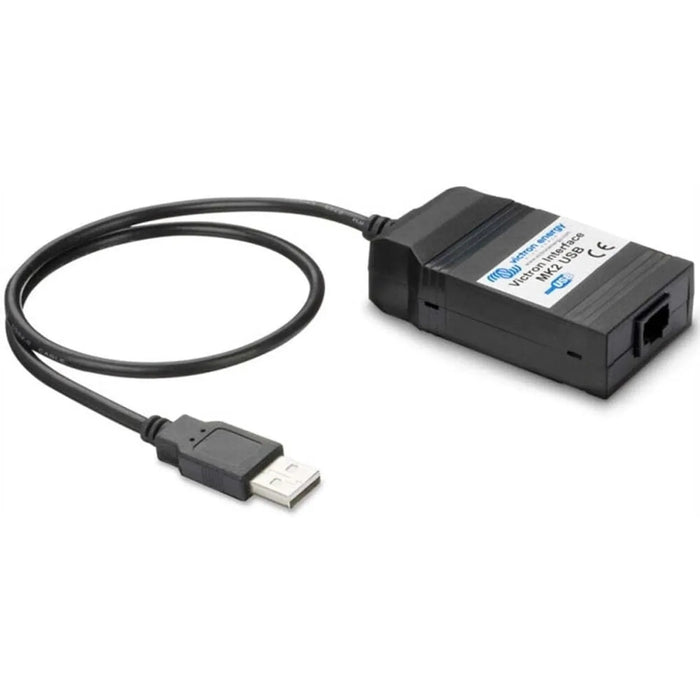
The Victron MK2-USB interface connects a Victron Phoenix Charger to a Windows PC via USB, giving installers a way to configure and monitor the charger through VEConfigure software. It is built for technicians who need to adjust charger settings or check operational data on-site.
Key features
- Connection, USB link between a Windows PC and a compatible Victron Phoenix Charger.
- Software, works with Victron's VEConfigure for configuration and monitoring.
- Weight, 60g, easy to carry in a tool kit.
- Compatibility, for the Victron Phoenix Charger range only, not interchangeable with other Victron products.
- SKU, ASS030130010, GTIN 8719076019428.
Product overview
The MK2-USB interface translates communication between the Phoenix Charger's VE.Bus port and a standard USB port. Once connected, a technician can use VEConfigure to read and adjust settings such as charge algorithm parameters, absorption voltage, float voltage and current limits, depending on the charger model in use.
This interface is specific to the Phoenix Charger. It is not interchangeable with the MK3-USB interface used for Multi and Quattro inverter/chargers. A MultiPlus or Quattro installation needs a different interface entirely.
Applications
- Configuring Phoenix Charger settings on-site with a Windows laptop.
- Reading operational data and charge status during commissioning.
- Adjusting charge profiles for different battery chemistries.
- Firmware updates on supported Phoenix Charger units.
What's in the box
- 1 x Victron MK2-USB interface cable (ASS030130010)
Installation notes
This is a configuration tool rather than a permanent installation part. Connect it to the Phoenix Charger's VE.Bus port and a USB port on the PC, with the charger powered during setup. Configuration changes should be carried out by a technician familiar with the battery system in use.
More in Victron Miscellaneous
 Victron VE.Direct Cable 5m£11.40inc VAT
£9.50exc VAT
Victron VE.Direct Cable 5m£11.40inc VAT
£9.50exc VAT
 Victron VE.Direct Cable 0.3m Data Cable£9.27inc VAT
£7.73exc VAT
Victron VE.Direct Cable 0.3m Data Cable£9.27inc VAT
£7.73exc VAT
 Victron Galvanic Isolator VDI-64A Shore Power Protection£261.44inc VAT
£217.87exc VAT
Victron Galvanic Isolator VDI-64A Shore Power Protection£261.44inc VAT
£217.87exc VAT
 Victron RJ45 UTP Cable 20m£26.76inc VAT
£22.30exc VAT
Victron RJ45 UTP Cable 20m£26.76inc VAT
£22.30exc VAT
 Victron Isolation Transformer 2500W 115/230V£307.64inc VAT
£256.37exc VAT
Victron Isolation Transformer 2500W 115/230V£307.64inc VAT
£256.37exc VAT
 Victron Splitter Cord CEE Plug to 2x CEE Coupling 16A/250V£65.09inc VAT
£54.24exc VAT
Victron Splitter Cord CEE Plug to 2x CEE Coupling 16A/250V£65.09inc VAT
£54.24exc VAT