
All Energy Monitoring & Control

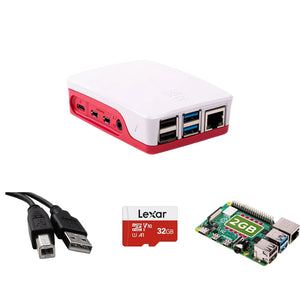 Solar Assistant Monitor for Growatt SPF Inverters£187.95inc VAT
£156.63exc VAT
Solar Assistant Monitor for Growatt SPF Inverters£187.95inc VAT
£156.63exc VAT
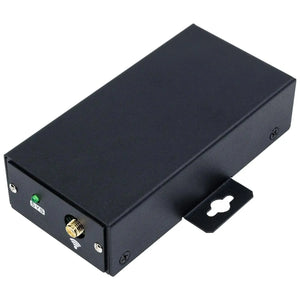 Wi-Fi Monitoring Box for InfiniSolar & Voltasol Hybrid Inverters£76.07inc VAT
£63.39exc VAT
Wi-Fi Monitoring Box for InfiniSolar & Voltasol Hybrid Inverters£76.07inc VAT
£63.39exc VAT
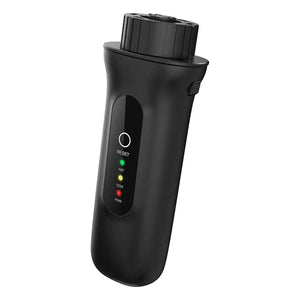 Solis S5-WiFi-ST WiFi Data Logger 4-Pin for up to 10 Inverters£28.98inc VAT
£24.15exc VAT
Solis S5-WiFi-ST WiFi Data Logger 4-Pin for up to 10 Inverters£28.98inc VAT
£24.15exc VAT
 Solar Panel Tester Multimeter 800W MPPT£82.12inc VAT
£68.43exc VAT
Solar Panel Tester Multimeter 800W MPPT£82.12inc VAT
£68.43exc VAT
 Victron GX Touch 70 Flush Mount Display£309.74inc VAT
£258.12exc VAT
Victron GX Touch 70 Flush Mount Display£309.74inc VAT
£258.12exc VAT
 Victron GX Touch 50 Wall Mount Bracket£13.37inc VAT
£11.14exc VAT
View all 43 in Energy Monitoring & Control →
Victron GX Touch 50 Wall Mount Bracket£13.37inc VAT
£11.14exc VAT
View all 43 in Energy Monitoring & Control →

Solar Assistant Monitoring Kit | Sunsynk Deye Raspberry Pi 4
£205.80
Skip to product information


Solar Assistant Monitoring Kit | Sunsynk Deye Raspberry Pi 4
- Vendor
- Voltacon
- SKU
- SUNSYNK-SA
- Availability
- In stock
- Weight
- 0.5 kg
£205.80inc VAT £171.50exc VAT
Secure checkout
Talk to our sales team
Product Description
Monitor your hybrid inverter setup in real time with this ready-to-use Solar Assistant kit, built around a Raspberry Pi 4. It works with Sunsynk, Deye, Sol-Ark and Fusion Hybrid inverters, showing PV generation, battery state of charge, grid import/export and load consumption in a browser or app based dashboard. No subscription fees, no manual setup.
Key features
- Pre-loaded hardware, Raspberry Pi 4 Model B (2GB RAM, 1.8GHz quad-core CPU) with Solar Assistant software already installed
- Storage, 32GB Lexar Micro SD card included
- Power supply, official Raspberry Pi USB-C 5V power supply included
- Inverter connection, RJ45 to USB RS485 communication cable
- Enclosure, pre-configured plastic case with cooling fan and full port access
- Access, remote monitoring via web browser, Android or iPhone app
Product overview
The kit arrives fully assembled and pre-configured, so there is no software installation or system setup to do. Connect it, power it on, and the dashboard starts showing your inverter data with dynamic charts.
Communication runs through the inverter's RS485 port using the included RJ45 to USB cable. That port needs to be free before you install the kit. If RS232 or Wi-Fi is already in use on your inverter, RS485 is the alternative route in. Parallel or three phase systems need one cable per inverter.
An optional RJ45 splitter is sold separately for Deye, Sunsynk and Sol-Ark owners who need to share the BMS port between battery communication and the Solar Assistant cable. It separates the CAN and RS485 lines so the two signals do not conflict.
Compatible inverters
- Sunsynk
- Deye
- Sol-Ark
- Fusion Hybrid
What's in the box
- Raspberry Pi 4 Model B (2GB RAM) in a pre-configured enclosure with cooling fan
- 32GB Lexar Micro SD card, pre-loaded with Solar Assistant software
- Official Raspberry Pi USB-C 5V power supply
- RJ45 to USB RS485 communication cable
- Step-by-step installation instructions and an online video guide
Installation notes
Check that your inverter's RS485 port is free before ordering. The communication connection itself carries no mains voltage, but the inverter must still be installed and serviced only by a qualified electrician or solar installer. Do not open or modify the Raspberry Pi enclosure while it is running.
Technical Specifications 12 rows Show
| Specification | Value |
|---|---|
| Processor | 1.8GHz 64-bit quad-core |
| Memory | 2GB |
| Wireless connectivity | 2.4GHz and 5.0GHz 802.11ac Wi-Fi, Bluetooth 5.0 / BLE |
| Network port | Gigabit Ethernet |
| USB connections | 2x USB 3.0, 2x USB 2.0 |
| GPIO header | Standard 40-pin GPIO header |
| Video output | 2x micro-HDMI (up to 4Kp60) |
| Included storage | 32GB Lexar Micro SD card (pre-loaded) |
| Power requirement | 5V DC via USB-C (minimum 3A) |
| Pre-installed software | Solar Assistant (pre-installed) |
| Inverter cable | RJ45 to USB RS485 |
| Case dimensions | 104 x 74 x 36 mm |
Manufacturer datasheet. Figures as published by the manufacturer.
More in Energy Monitoring & Control
 Solar Assistant Monitor for Growatt SPF Inverters£187.95inc VAT
£156.63exc VAT
Solar Assistant Monitor for Growatt SPF Inverters£187.95inc VAT
£156.63exc VAT
 Wi-Fi Monitoring Box for InfiniSolar & Voltasol Hybrid Inverters£76.07inc VAT
£63.39exc VAT
Wi-Fi Monitoring Box for InfiniSolar & Voltasol Hybrid Inverters£76.07inc VAT
£63.39exc VAT
 Solis S5-WiFi-ST WiFi Data Logger 4-Pin for up to 10 Inverters£28.98inc VAT
£24.15exc VAT
Solis S5-WiFi-ST WiFi Data Logger 4-Pin for up to 10 Inverters£28.98inc VAT
£24.15exc VAT
 Solar Panel Tester Multimeter 800W MPPT£82.12inc VAT
£68.43exc VAT
Solar Panel Tester Multimeter 800W MPPT£82.12inc VAT
£68.43exc VAT
 Victron GX Touch 70 Flush Mount Display£309.74inc VAT
£258.12exc VAT
Victron GX Touch 70 Flush Mount Display£309.74inc VAT
£258.12exc VAT
 Victron GX Touch 50 Wall Mount Bracket£13.37inc VAT
£11.14exc VAT
Victron GX Touch 50 Wall Mount Bracket£13.37inc VAT
£11.14exc VAT


